Access the BMW 5 Series owner manual as a free PDF built for fast answers. The manual can be opened quickly in your browser. You can read it on mobile, print the needed pages, or download the full PDF for offline use. Use the manual to match controls, check control warnings, warning lights, service items, and feature settings to your exact BMW 5 Series year and model. The correct manual prevents wrong tyre pressure values, wrong iDrive menu paths, and wrong fluid specifications. The manuals are listed in our library by year, model, and generation. It allows you to pick the right file quickly and easily.
All BMW 5 Series owner manuals here are free. No purchase, no paywall, and no account requirement. Use the PDF search tool to find a section by system term, icon name, or problem keyword, then jump to the page that explains the message and the next step. Save the PDF to your phone for roadside reference. Keep a printed copy for garage work. We publish an owner’s manual by year and model, and we keep expanding the index. We are constantly updating, so new PDFs and replacements appear as soon as they are available. Use Ctrl+F or the search bar on mobile to locate terms, then print only the pages you need for that repair.
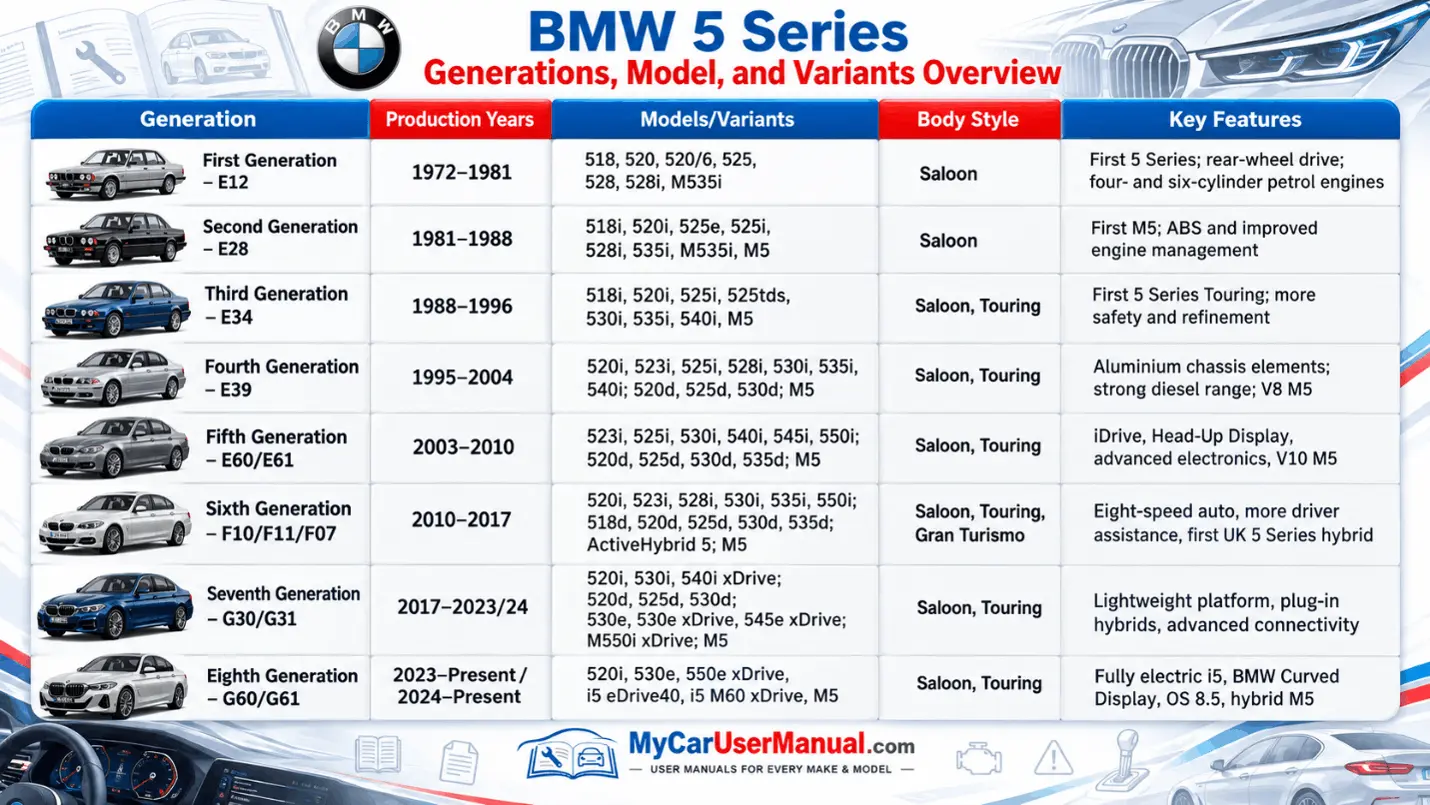
BMW 5 Series generations use different dashboards, electronics, and menu logic, so the correct PDF user manual matters. E28, E34, E39, E60, F10, and G30 vehicles do not share the same controls, fuse locations, service displays, or driver assistance settings. Use the by-generation and by-year list to open the manual that matches your chassis and build year. Free PDF viewing lets you confirm button labels, instrument cluster symbols, and iDrive paths before you change a setting or start a maintenance step.
The BMW 5 Series PDF library supports older and newer models. It keeps the manual workflow simple. You can view, search, print, and download the manual with ease. Many official PDFs cover multiple trims, engines, and option packages, so the model notes at the front of the file before you follow instructions. Use search for terms like Driving Assistant, head-up display, Comfort Access, xDrive, adaptive suspension, or lane departure warning to reach the exact feature pages. Download the PDF for offline access. You can use it in garages, basements, and areas with a weak signal. Check back often as we add missing model years.
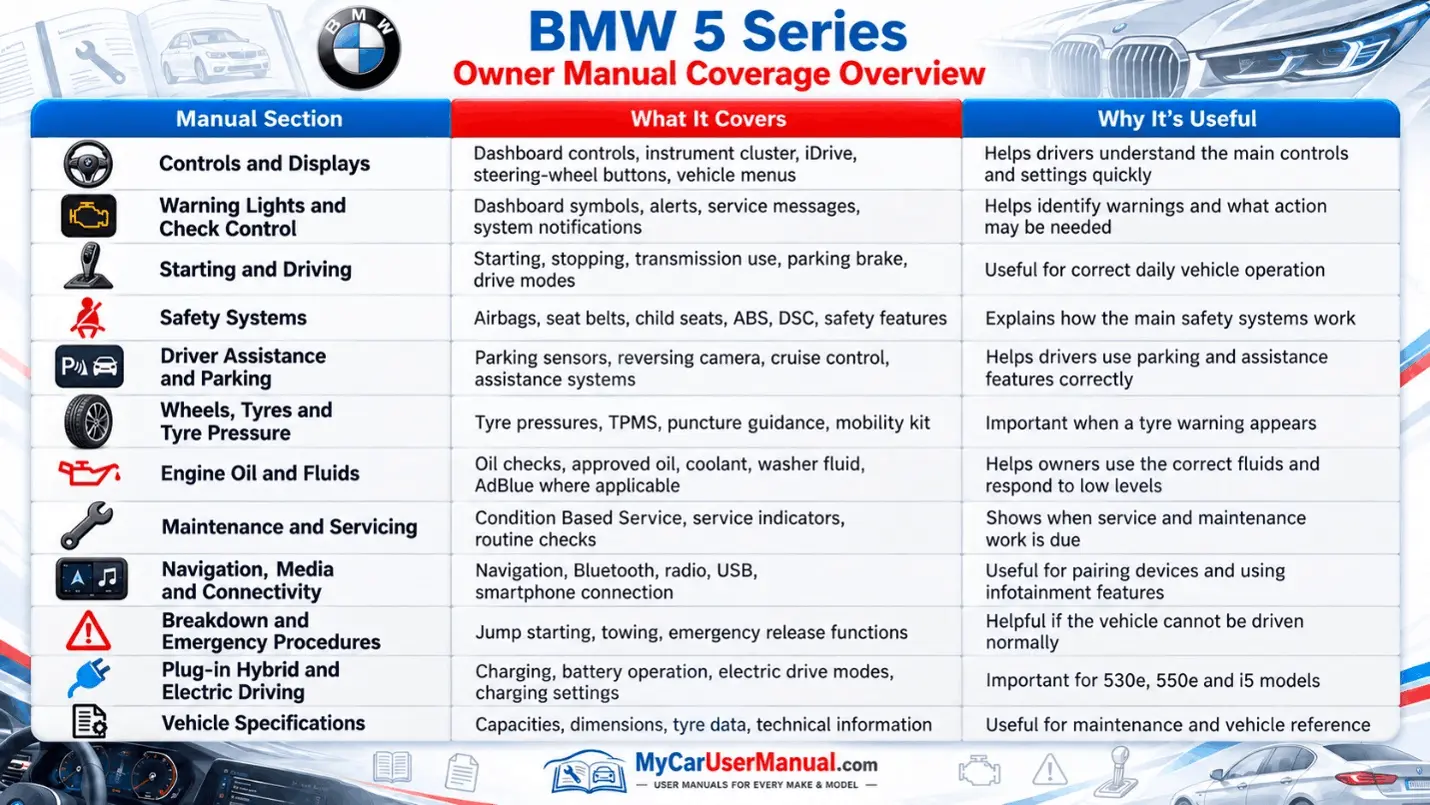
The BMW 5 Series owner’s manual covers daily operation and safety using BMW system names and control labels. It explains instrument cluster icons, check control messages, control display menus, steering wheel buttons, lighting, wipers, mirrors, seats, climate control, audio, navigation, and driver profiles. It lists fuel requirements, engine oil specifications, coolant guidance, brake fluid notes, and other approved fluids. It includes tyre and wheel data, tyre pressure tables, recommended tyre sizes, and cold pressure values by load.
The manual also covers owner maintenance and roadside procedures that reduce risk and prevent component damage. It explains condition-based service, service interval displays, and basic checks you can do without special tools. It includes jump-start steps, battery charging guidance, towing points, jack points, and safety warnings for lifting the car. Many manuals provide fuse charts, bulb guidance where replacement is allowed, and cabin filter notes. It outlines parking aid behavior, traction control settings, driving modes, and safety limits for driver assistance systems. Follow the information in the manual for oil level checks, washer fluid refills, and tyre wear inspection, because small checks prevent big faults.
Choose the BMW 5 Series manual that matches the production year, model, and market version. Use the table of contents to map the section layout. Use the PDF search box for short system words, not long questions. Search terms like TPMS, tyre pressure monitor, engine oil level, coolant, brake fluid, iDrive, Bluetooth, pairing, navigation, key battery, start/stop, or check control. When you land on a page, read the warning notes first, then follow the steps in order. Use cross-references and diagrams to move from symptoms to causes and then to actions.
Use the index to align your symptom with BMW wording, because BMW labels differ from common slang. Match phrases like check control, control display, selector lever, electronic parking brake, and condition based service to find the correct pages faster. Add PDF bookmarks for high-use pages, such as warning light lists, tyre pressure charts, fluid specs, towing guidance, and fuse maps. Print the pages you use in the garage, especially jack points and towing points, to prevent underbody damage. Keep the downloaded BMW 5 Series owner manual PDF in a folder labeled by year and model.
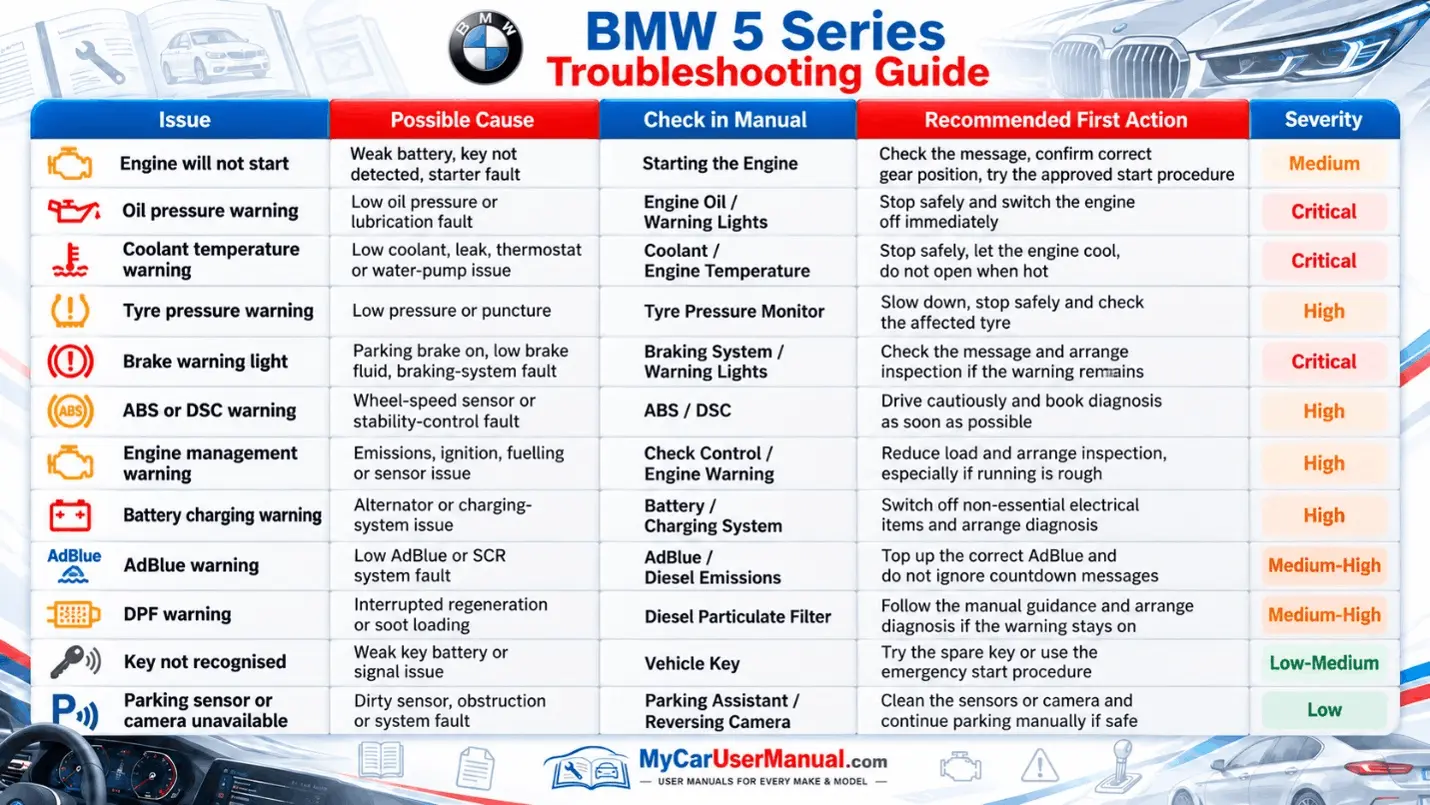
Use the BMW 5 Series owner’s manual as the first troubleshooting tool when a warning light or message appears. The manual defines the symbol, names the system, and lists safe next steps. For low tyre pressure, battery discharge warning, coolant level warning, oil level message, or washer fluid low, the manual explains checks you can do and limits on driving. It tells you when to stop driving and when to contact roadside assistance. It also shows where to find system status screens in iDrive, how to acknowledge messages, and what to monitor after a reset.
For common comfort and connectivity issues, the manual helps separate settings problems from hardware faults. It covers TPMS reset after inflation, driver profile selection, audio source settings, Bluetooth pairing, phone permission prompts, and control display options that can mute alerts. It explains the correct start procedure, key recognition limits, and battery care for long parking periods. For towing and immobilized vehicle cases, it lists tow mode steps, neutral selection guidance when required, and safe recovery rules. If the issue returns after the manual steps, use the manual terms to describe the issue clearly when you talk to a technician.